Connect your tools
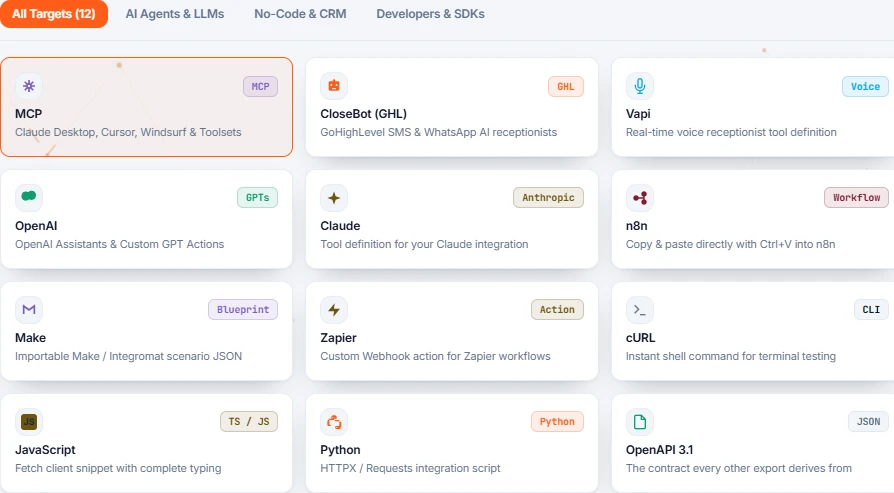
Find the right configuration in Integrations & Exports.
Your workflow can call the connector with the right inputs.
Your connector inputs, already structured.
Your path, in three steps.
- 01
Open exports
On the connector, choose Integrations & Exports. Select your tool to see its configuration.
- 02
Import the configuration
Use the n8n workflow, Make blueprint or tool definition for your destination.
- 03
Map your data
Replace example values with workflow data and verify the response against a known case.
Want to go deeper?
Open just the topic you need.
Overview
On each connector there is an Integrations & Exports tab. Pick the tool you use, copy what it gives you, paste it there. That is the whole procedure — Vela produces the exact thing each tool expects, already filled in for your connector.
date2026-09-24slots| Your tool | What you get |
|---|---|
| n8n | A ready-made workflow. Paste it onto the canvas and it runs. |
| Make | A blueprint to import as a scenario. |
| Zapier | The settings to fill into a Webhooks step. |
| CloseBot | A tool definition to attach to your bot. |
| Vapi | A tool for a voice assistant, so it can actually do the thing on the call. |
| ChatGPT / Claude | A tool definition for assistants you build yourself. |
| Something else | A plain web address anything can call, plus a ready-made command to test it. |
Some of these contain your key
The n8n, Make, Zapier, Vapi and command-line versions include the connector's secret key — that is what makes them work as soon as they are pasted. Treat them like a password: do not put them in a public document or a shared chat.
If your tool is an AI assistant rather than an automation platform, AI assistants is the page you want.
Bring your business software into an n8n workflow.
↗Your situation doesn’t match the guide?
Talk to the team ↗