Understand your connection
What is stored, what expires, and what renews without you.
Know why a connector loses access, and what prevents it.
Its lifetime depends on the software. The connector can refresh it when that flow is supported.
They can allow a fresh sign-in. Additional verification may need your involvement.
Your path, in three steps.
- 01
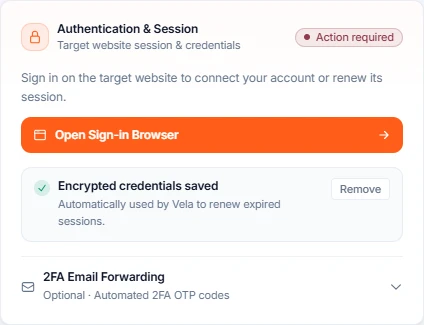
Two things are stored
The session, which the site expires whenever it likes, and, if you allowed it, your encrypted sign-in. Never a one-time code.
- 02
Reconnection depends on the site
Vela can refresh a session or attempt sign-in with saved credentials. If a human check is required, the flow hands back to you.
- 03
Each account keeps its own connection
Reusing a connector for another client shares the logic, never the session or the credentials.
Want to go deeper?
Open just the topic you need.
Overview
A connector can lose access even when the site’s features have not changed. Sessions expire, passwords change and some sign-ins need your approval. Here is what Vela can renew and when it asks you to intervene.
Its lifetime depends on the software. The connector can refresh it when that flow is supported.
They can allow a fresh sign-in. Additional verification may need your involvement.
The two things Vela holds
| The session | The saved sign-in | |
|---|---|---|
| What it is | What the site handed your browser when you signed in, so it keeps recognising you. | Your username and password for that site, if you chose to save them. |
| Created when | You sign in during the build, or during a reconnection. | Only if you tick Save these credentials during a reconnection. |
| Lives for | However long the site decides. Hours on a bank, weeks on a booking tool. Vela does not control it. | Until you replace or delete it. |
| Recovery | Refresh may be supported by the connector and site. | Can allow a fresh sign-in when the site does not require human approval. |
| Stored how | Encrypted, tied to the connector. | Encrypted, tied to the connector, never embedded in the generated module. |
Second factors are never stored
A one-time code completes the verification requested by the site. Depending on the supported verification options, you may need to intervene. Follow the connector’s sign-in flow.
The order things happen in
- 1
A call arrives
From your automation, an AI assistant, the playground or an automatic check. They all take the same path.
- 2
The session is checked first, not after
For a connector that changes something, the sign-in is refreshed before the action rather than after a failure. Discovering the session is dead halfway through a booking is exactly the situation nobody can clean up afterwards.
- 3
If recovery is supported
The connector may refresh its session. A supported password sign-in can also use the saved credentials. Success depends on the site; it is not guaranteed by the presence of a saved password.
- 4
If that unattended sign-in fails
Vela stops trying. It will not attempt another unattended sign-in on that connector for 24 hours, and it asks you instead. Signing in yourself clears that wait immediately.
- 5
If no sign-in is saved, or a person is needed
The connector goes to Reconnection required and you get one email for that connector. The procedure is in Sign a connector back in.
Why the 24-hour wait exists
A password that is refused is often a password that changed, and a service that keeps trying a wrong password is a service that gets the account locked. Waiting is the behaviour that protects your account on the other site; it is not Vela giving up.
Why a connection dies
| Cause | How it looks | What fixes it |
|---|---|---|
| The session simply expired | Authentication failures on a previously working connector. | Supported automatic recovery may restore it. Otherwise, reconnect manually. |
| The password changed on the site | The unattended sign-in fails, then stops for 24 hours. | Reconnect and tick the box to replace the saved credentials. |
| The site asked for a one-time code | The connector reports that a code is required. | Complete the requested verification. Available options depend on the site. |
| The account lost a permission | The sign-in works, the action is refused. | Restore the right on the site itself. Vela cannot grant it. |
| The site logged every session out | Several connectors on the same site break at once. | Reconnect them. This is the case where saved credentials earn their keep. |
One connection per account, always
When the same connector is reused for several customers, each installation carries its own sign-in. The shape of the task is shared; the access never is. A customer whose session expires affects nobody else, and removing one installation takes its credentials with it. See The same connector for several accounts.
What you can check yourself
- Check health runs the appropriate safe check. For a write, it may check only authentication or report unverified; it does not execute the business action.
- Activity & Logs shows whether the failures are authentication failures or something else. The two lead to different pages of this guide.
- Repeated sign-in requests can come from short sessions or additional checks imposed by the site. Review the reason shown before changing the saved credentials.
Where to go next
- Sign a connector back in — the procedure, step by step.
- How Vela repairs itself — what happens when the site, not the sign-in, is the problem.
Identify what failed before trying again.
↗Your situation doesn’t match the guide?
Talk to the team ↗